Get action confirmation for ADK Tools
Some agent workflows require confirmation for decision making, verification, security, or general oversight. In these cases, you want to get a response from a human or supervising system before proceeding with a workflow. The Tool Confirmation feature in the Agent Development Kit (ADK) allows an ADK Tool to pause its execution and interact with a user or other system for confirmation or to gather structured data before proceeding. You can use Tool Confirmation with an ADK Tool in the following ways:
- Boolean Confirmation: You can configure a tool with a confirmation flag or provider. This option pauses the tool for a yes or no confirmation response.
- Advanced Confirmation: For scenarios requiring structured data responses, you can configure a tool with a text prompt to explain the confirmation and an expected response.
Experimental
The Tool Confirmation feature is experimental and has some known limitations. We welcome your feedback!
You can configure how a request is communicated to a user, and the system can also use remote responses sent via the ADK server's REST API. When using the confirmation feature with the ADK web user interface, the agent workflow displays a dialog box to the user to request input, as shown in Figure 1:
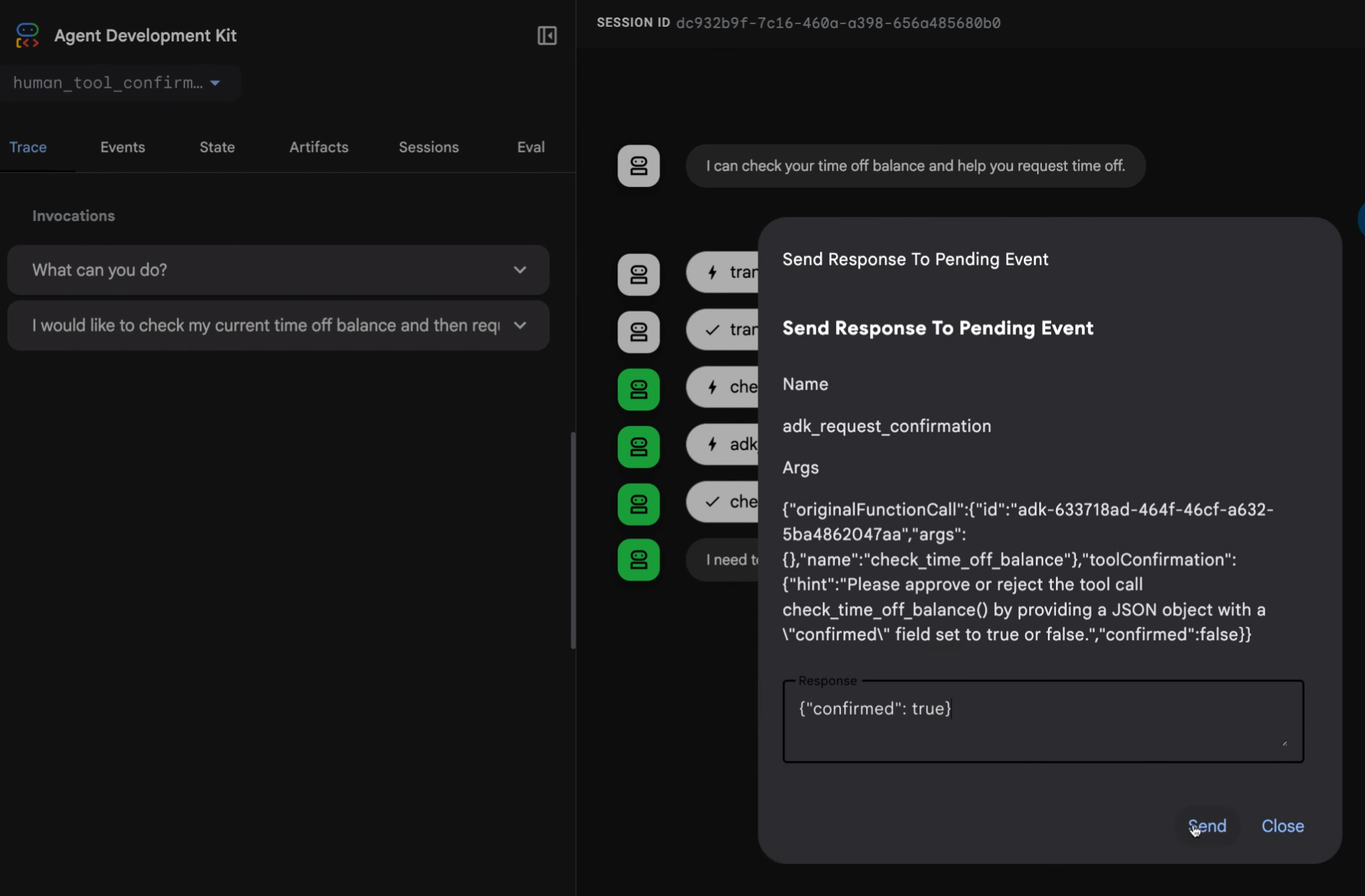
Figure 1. Example confirmation response request dialog box using an advanced, tool response implementation.
The following sections describe how to use this feature for the confirmation scenarios. For a complete code sample, see the human_tool_confirmation example. There are additional ways to incorporate human input into your agent workflow, for more details, see the Human-in-the-loop agent pattern.
Boolean confirmation
When your tool only requires a simple yes or no from the user, you can
append a confirmation step. In Python, Go, and Java, you can enable this by
wrapping the tool with the FunctionTool class and setting the
require_confirmation parameter (or equivalent) to True. In TypeScript, you
implement this logic manually within the execute function using the
ToolContext.
The following examples show how to enable boolean confirmation:
root_agent = Agent(
    # ...
    tools = [
        # Set require_confirmation to True to require user confirmation
        # for the tool call.
        FunctionTool(reimburse, require_confirmation=True),
    ],
    # ...
)

# This implementation method requires minimal code, but is limited to simple
# approvals from the user or confirming system. For a complete example of this
# approach, see the following code sample for a more detailed example:
# https://github.com/google/adk-python/blob/main/contributing/samples/human_tool_confirmation/agent.py
Note
ADK for TypeScript currently requires manual implementation of
confirmation logic within the tool's execute function.
/**
 * A reimbursement tool with dynamic confirmation logic.
 */
export const reimburseTool = new FunctionTool({
  name: 'reimburse',
  description: 'Reimburse an amount. Large amounts (>1000) require manager approval.',
  parameters: z.object({
    amount: z.coerce.number().describe('The amount to reimburse.'),
  }),
  execute: async ({amount}, toolContext) => {
    // 1. Check if we already have a confirmed response.
    if (toolContext?.toolConfirmation?.confirmed) {
      const isLarge = amount > 1000;
      return {
        status: 'SUCCESS',
        message: isLarge
          ? `Large reimbursement of ${amount} approved by manager and processed.`
          : `Reimbursement of ${amount} has been successfully processed.`,
      };
    }

    // 2. Request a tool confirmation.
    const isLarge = amount > 1000;
    toolContext?.requestConfirmation({
      hint: isLarge
        ? `The amount ${amount} exceeds the $1000 limit and requires manager approval.`
        : `Do you want to reimburse ${amount}?`,
      payload: {amount},
    });

    // 3. Return a status that tells the agent we are waiting.
    // Note: The model won't see this until the turn resumes after confirmation.
    return {
      status: isLarge ? 'AWAITING_MANAGER_APPROVAL' : 'AWAITING_CONFIRMATION',
      message: 'This request requires approval to proceed.',
    };
  },
});

export const rootAgent = new LlmAgent({
  name: 'Finance_Assistant',
  model: 'gemini-flash-latest',
  instruction: `You are a Finance Assistant.
  - You MUST use the 'reimburse' tool for ALL reimbursement requests.
  - MANDATORY: Every tool call MUST be accompanied by a text response in the same message.
  - THRESHOLD LOGIC:
    - For amounts <= 1000: Say "I am initiating the reimbursement request for [amount]. Please confirm it to proceed."
    - For amounts > 1000: Say "I am initiating the reimbursement request for [amount]. Since this exceeds $1000, manager approval is required. Please confirm the request to submit it for review."
  - EXAMPLES:
    User: "Reimburse me $45"
    Model: "I am initiating the reimbursement request for 45. Please confirm it to proceed." [Tool Call: reimburse(amount=45)]

    User: "Reimburse me $2500"
    Model: "I am initiating the reimbursement request for 2500. Since this exceeds $1000, manager approval is required. Please confirm the request to submit it for review." [Tool Call: reimburse(amount=2500)]
  - If the user provides a currency symbol (like $), ignore it and pass only the number to the tool.
  - In the Web UI, the user will see a 'Confirm' button. In the terminal, the user should simulate a confirmation response.`,
  tools: [reimburseTool],
});
reimburseTool, _ := functiontool.New(functiontool.Config{
    Name:        "reimburse",
    Description: "Reimburse an amount",
    // Set RequireConfirmation to true to require user confirmation
    // for the tool call.
    RequireConfirmation: true,
}, func(ctx tool.Context, args ReimburseArgs) (ReimburseResult, error) {
    // actual implementation
    return ReimburseResult{Status: "ok"}, nil
})

rootAgent, _ := llmagent.New(llmagent.Config{
    // ...
    Tools: []tool.Tool{reimburseTool},
})
Require confirmation function
You can modify the behavior of the confirmation requirement by using a function that returns a boolean response based on the tool's input. In TypeScript, this is handled by adding conditional logic to your execute function.
async def confirmation_threshold(
    amount: int, tool_context: ToolContext
) -> bool:
  """Returns true if the amount is greater than 1000."""
  return amount > 1000

root_agent = Agent(
    # ...
    tools = [
        # Pass the threshold function to dynamically require confirmation
        FunctionTool(reimburse, require_confirmation=confirmation_threshold),
    ],
    # ...
)
reimburseTool, _ := functiontool.New(functiontool.Config{
    Name:        "reimburse",
    Description: "Reimburse an amount",
    // RequireConfirmationProvider allows for dynamic determination
    // of whether user confirmation is needed.
    RequireConfirmationProvider: func(args ReimburseArgs) bool {
        return args.Amount > 1000
    },
}, func(ctx tool.Context, args ReimburseArgs) (ReimburseResult, error) {
    // actual implementation
    return ReimburseResult{Status: "ok"}, nil
})
// In ADK Java, dynamic threshold confirmation logic is evaluated directly
// inside the tool logic using the ToolContext rather than via a lambda parameter.
public Map<String, Object> reimburse(
    @Schema(name="amount") int amount, ToolContext toolContext) {

  // 1. Dynamic threshold check
  if (amount > 1000) {
    Optional<ToolConfirmation> toolConfirmation = toolContext.toolConfirmation();
    if (toolConfirmation.isEmpty()) {
       toolContext.requestConfirmation("Amount > 1000 requires approval.");
       return Map.of("status", "Pending manager approval.");
    } else if (!toolConfirmation.get().confirmed()) {
       return Map.of("status", "Reimbursement rejected.");
    }
  }

  // 2. Proceed with actual tool logic
  return Map.of("status", "ok", "reimbursedAmount", amount);
}

LlmAgent rootAgent = LlmAgent.builder()
    // ...
    .tools(
        // No requireConfirmation flag is set because the custom threshold
        // logic is already handled inside the method!
        FunctionTool.create(this, "reimburse")
    )
    // ...
    .build();
Advanced confirmation
When a tool confirmation requires more details for the user or a more complex
response, use a tool_confirmation implementation. This approach extends the
ToolContext object to add a text description of the request for the user and
allows for more complex response data. When implementing tool confirmation this
way, you can pause a tool's execution, request specific information, and then
resume the tool with the provided data.
This confirmation flow has a request stage where the system assembles and sends an input request human response, and a response stage where the system receives and processes the returned data.
Confirmation definition
When creating a Tool with advanced confirmation, use the Tool Context Request Confirmation method with hint and payload parameters:
hint: Descriptive message that explains what is needed from the user.payload: The structure of the data you expect in return. This must be serializable into a JSON-formatted string.
For a complete example of this approach, see the
human_tool_confirmation
code sample. Keep in mind that the agent workflow tool execution pauses while a
confirmation is obtained. After confirmation is received, you can access the
confirmation response in the tool_confirmation.payload object and then proceed
with the execution of the workflow.
The following code shows an example implementation for a tool that processes time off requests for an employee:
def request_time_off(days: int, tool_context: ToolContext):
    """Request day off for the employee."""
    # ...
    tool_confirmation = tool_context.tool_confirmation
    if not tool_confirmation:
        tool_context.request_confirmation(
            hint=(
                'Please approve or reject the tool call request_time_off() by'
                ' responding with a FunctionResponse with an expected'
                ' ToolConfirmation payload.'
            ),
            payload={
                'approved_days': 0,
            },
        )
        # Return intermediate status indicating that the tool is waiting for
        # a confirmation response:
        return {'status': 'Manager approval is required.'}

    approved_days = tool_confirmation.payload['approved_days']
    approved_days = min(approved_days, days)
    if approved_days == 0:
        return {'status': 'The time off request is rejected.', 'approved_days': 0}
    return {
        'status': 'ok',
        'approved_days': approved_days,
    }
/**
 * A tool that requests time off for an employee.
 * It uses the Advanced Confirmation pattern to request manager approval.
 */
export const requestTimeOffTool = new FunctionTool({
  name: 'request_time_off',
  description: 'Request days off for the employee.',
  parameters: z.object({
    days: z.number().describe('The number of days requested.'),
  }),
  execute: async ({days}, toolContext) => {
    const confirmation = toolContext?.toolConfirmation;

    if (!confirmation) {
      // Step 1: Request confirmation with a payload
      toolContext?.requestConfirmation({
        hint:
          'Please approve or reject the tool call request_time_off() by ' +
          'responding with a FunctionResponse with an expected ' +
          'ToolConfirmation payload.',
        payload: {
          approved_days: 0,
        },
      });

      // Return a descriptive status to the agent
      return {
        status: 'PENDING_MANAGER_APPROVAL',
        message: `A request for ${days} days is pending manager approval.`,
      };
    }

    // Step 2: Process the confirmation response
    if (!confirmation.confirmed) {
      return {
        status: 'CANCELLED',
        message: 'The request was cancelled by the user.',
      };
    }

    let approvedDays = (confirmation.payload as any)['approved_days'] as number;
    approvedDays = Math.min(approvedDays, days);

    if (approvedDays === 0) {
      return {
        status: 'REJECTED',
        message: 'The time off request was rejected by the manager.',
        approved_days: 0,
      };
    }

    return {
      status: 'SUCCESS',
      message: `The request for ${days} days was approved (Total approved: ${approvedDays}).`,
      approved_days: approvedDays,
    };
  },
});

export const rootAgent = new LlmAgent({
  name: 'HR_Assistant',
  model: 'gemini-flash-latest',
  instruction: `You are an HR Assistant.
  1. Use the 'request_time_off' tool to help employees with leave requests.
  2. MANDATORY: Every tool call MUST be accompanied by a text response in the same message.
  3. EXAMPLE:
     User: "I want 5 days off"
     Model: "I am initiating your leave request for 5 days. Management approval is required, so please confirm this request." [Tool Call: request_time_off(days=5)]
  4. In the terminal, if they want to 'confirm', tell them to simulate a confirmation response.
  5. Once confirmed, the system will automatically provide the result of the approval.`,
  tools: [requestTimeOffTool],
});
func requestTimeOff(ctx tool.Context, args RequestTimeOffArgs) (map[string]any, error) {
    confirmation := ctx.ToolConfirmation()
    if confirmation == nil {
        ctx.RequestConfirmation(
            "Please approve or reject the tool call requestTimeOff() by "+
            "responding with a FunctionResponse with an expected "+
            "ToolConfirmation payload.",
            map[string]any{"approved_days": 0},
        )
        return map[string]any{"status": "Manager approval is required."}, nil
    }

    payload := confirmation.Payload.(map[string]any)
    // Values in map[string]any from JSON are float64 by default in Go
    approvedDays := int(payload["approved_days"].(float64))
    approvedDays = min(approvedDays, args.Days)

    if approvedDays == 0 {
        return map[string]any{"status": "The time off request is rejected.", "approved_days": 0}, nil
    }

    return map[string]any{
        "status": "ok",
        "approved_days": approvedDays,
    }, nil
}
public Map<String, Object> requestTimeOff(
    @Schema(name="days") int days,
    ToolContext toolContext) {
    // Request day off for the employee.
    // ...
    Optional<ToolConfirmation> toolConfirmation = toolContext.toolConfirmation();
    if (toolConfirmation.isEmpty()) {
        toolContext.requestConfirmation(
            "Please approve or reject the tool call requestTimeOff() by " +
            "responding with a FunctionResponse with an expected " +
            "ToolConfirmation payload.",
            Map.of("approved_days", 0)
        );
        // Return intermediate status indicating that the tool is waiting for
        // a confirmation response:
        return Map.of("status", "Manager approval is required.");
    }

    Map<String, Object> payload = (Map<String, Object>) toolConfirmation.get().payload();
    int approvedDays = (int) payload.get("approved_days");
    approvedDays = Math.min(approvedDays, days);

    if (approvedDays == 0) {
        return Map.of("status", "The time off request is rejected.", "approved_days", 0);
    }

    return Map.of(
        "status", "ok",
        "approved_days", approvedDays
    );
}
Remote confirmation with REST API
If there is no active user interface for a human confirmation of an agent
workflow, you can handle the confirmation through a command-line interface or by
routing it through another channel like email or a chat application. To confirm
the tool call, the user or calling application needs to send a
FunctionResponse event with the tool confirmation data.
You can send the request to the ADK API server's /run or /run_sse endpoint,
or directly to the ADK runner. The following example uses a curl command to
send the confirmation to the /run_sse endpoint:
 curl -X POST http://localhost:8000/run_sse \
 -H "Content-Type: application/json" \
 -d '{
    "app_name": "human_tool_confirmation",
    "user_id": "user",
    "session_id": "7828f575-2402-489f-8079-74ea95b6a300",
    "new_message": {
        "parts": [
            {
                "function_response": {
                    "id": "adk-13b84a8c-c95c-4d66-b006-d72b30447e35",
                    "name": "adk_request_confirmation",
                    "response": {
                        "confirmed": true,
                        "payload": {
                            "approved_days": 5
                        }
                    }
                }
            }
        ],
        "role": "user"
    }
}'
A REST-based response for a confirmation must meet the following requirements:
- The
idin thefunction_responseshould match thefunction_call_idfrom theadk_request_confirmationFunctionCallevent. - The
nameshould beadk_request_confirmation. -
The
responseobject contains theconfirmedstatus and any additionalpayloaddata.Note: Confirmation with Resume feature
If your ADK agent workflow is configured with the Resume feature, you also must include the Invocation ID (
invocation_id) parameter with the confirmation response. The Invocation ID you provide must be the same invocation that generated the confirmation request, otherwise the system starts a new invocation with the confirmation response. If your agent uses the Resume feature, consider including the Invocation ID as a parameter with your confirmation request, so it can be included with the response. For more details on using the Resume feature, see Resume stopped agents.
Known limitations
The tool confirmation feature has the following limitations:
- DatabaseSessionService is not supported by this feature.
- VertexAiSessionService is not supported by this feature.
Next steps
For more information on building ADK tools for agent workflows, see Function tools.